


Skip to content
Softfix Technologies
Services Industries Technologies Hire Portfolio About Blogs Let's Talk

Software Development

  • Custom Software Development
  • Enterprise Software Development
  • Software Product Engineering
  • Software Modernization

Application Development

  • Web Application Development
  • SaaS Product
    Development
  • CRM Development
  • ERP Development
  • Portal Development

Mobile Development

  • Android App Development
  • iOS App Development
  • Flutter Development
  • React Native Development
  • Cross-Platform Apps

Cloud Development

  • Cloud Application Development
  • Cloud Migration
  • AWS Development
  • Azure Development
  • Google Cloud
    Development

AI Solutions

  • AI Consulting
  • Generative AI
    Development
  • AI Chatbots & Agents

DevOps

  • Advanced DevOps
  • CI/CD Automation
  • Docker & Containers
  • Infrastructure as Code

Digital Marketing

  • SEO
  • Social Media Marketing
  • Paid Ads Management
  • Content Marketing
  • Conversion Optimization

QA Testing

  • Manual QA Testing
  • Test Automation
  • Performance Testing
  • Security Testing
  • QA Consulting
Free Consultation

Need Help Choosing The Right Solution?

Softfix Consultation
30-Minute Free Consultation
AI, Web & Mobile Experts
Response Within 4 Hours
Book Free Consultation

Focus

  • SEO (Search Engine Optimization)
  • Social Media Marketing
  • Paid Ads Management

Solutions

  • Custom Software Development
  • Enterprise Software Development
  • Application Development
  • Mobile Development
  • Cloud Development
  • AI Solutions
  • DevOps

Service Excellence

  • AWS logo AWS
  • Azure logo Azure
  • Google Cloud logo Google Cloud
  • Utho/IN logo Utho/IN
  • ReactJS logo ReactJS
  • NextJS logo NextJS
  • NodeJs logo NodeJS
  • PHP logo PHP
Free Consultation

Need Help Choosing The Right Solution?

Talk to Our Experts

30+

Experts

4 Hrs

Response

300+

Projects

Book Free Consultation

Industries Expertise

We help businesses across multiple industries build scalable, secure and future-ready digital products. Our team combines deep technical expertise with industry knowledge to deliver custom software solutions that drive growth.

Let's Talk

Industries We Serve

  • Healthcare
  • eLearning
  • Fintech
  • Real Estate
  • Tour & Travel
  • Education
  • Manufacturing
  • Logistics
  • eCommerce
  • Media & Entertainment
  • Non-Profit
Free Consultation

Need Help Choosing The Right Solution?

Talk to Our Experts

AI Strategy
Web Development
Mobile Apps
Expert Support
Book Free Consultation

Frontend

  • AngularJS
  • ReactJS
  • Vue.js
  • JavaScript
  • TypeScript
  • Tailwind CSS
  • ViteJS
  • CSS3
  • HTML5
  • NextJS

Backend

  • PHP
  • Node.js
  • .NET Core

Cloud

  • AWS
  • Google Cloud
  • Azure

CMS

  • WordPress

Database

  • SQL Server
  • MySQL
  • PostgreSQL
  • MongoDB
  • DynamoDB
  • Firebase

Emerging

  • Blockchain

DevOps

  • Azure DevOps

Mobile

  • iOS
  • Android
  • Flutter
  • React Native

Frameworks

  • Laravel
  • CodeIgniter

Ecommerce

  • Woo Commerce
  • Magento
  • Shopify
Free Consultation

Need Help Choosing The Right Solution?

Talk to Our Experts

Softfix consultation experts
Book Free Consultation

Trending

  • ReactJS Developers
  • NextJs Developers
  • NodeJS Developers
  • PHP Developers
  • ASP.NET Developers
  • iOS Developers
  • Flutter Developers
  • WordPress Developers
  • Shopify Developers

Frontend Developers

  • ReactJS Developers
  • JavaScript Developers
  • NextJS Developers
  • TypeScript Developers
  • Tailwind CSS Developers
  • HTML5 Developers

Backend Developers

  • ASP.NET Developers
  • PHP Developers
  • Python Developers
  • NodeJS Developers
  • ExpressJS Developers
  • Spring Boot Developers
  • Django Developers

Mobile App Developers

  • iOS Developers
  • Android Developers
  • Flutter Developers
  • React Native Developers

Ecommerce Developers

  • WordPress Developers
  • Magento Developers
  • Shopify Developers
Free Consultation

Need Help Choosing The Right Solution?

Talk to Our Experts

30+

Experts

200+

Clients

4 Hrs

Response
Book Free Consultation
Softfix Technologies
Services
Software Development
  • Custom Software Development
  • Enterprise Software Development
  • Software Product Engineering
  • Software Modernization
Application Development
  • Web Application Development
  • SaaS Product Development
  • CRM Development
  • ERP Development
  • Portal Development
Mobile Development
  • Android App Development
  • iOS App Development
  • Flutter Development
  • React Native Development
  • Cross‑Platform Apps
Cloud Development
  • Cloud Application Development
  • Cloud Migration
  • AWS Development
  • Azure Development
  • Google Cloud Development
AI Solutions
  • AI Consulting
  • Generative AI Development
  • AI Chatbots & Agents
DevOps
  • DevOps Consulting
  • CI/CD Automation
  • Cloud Infrastructure Management
  • DevOps Monitoring & Support
Digital Marketing
  • SEO
  • Social Media Marketing
  • Paid Ads Management
  • Content Marketing
  • Conversion Optimization
QA Testing
  • Manual QA Testing
  • Test Automation
  • Performance Testing
  • Security Testing
  • QA Consulting
Expertise
Focus
  • SEO
  • Social Media Marketing
  • Paid Ads Management
Solutions
  • Custom Software Development
  • Enterprise Software Development
  • Application Development
  • Mobile Development
  • Cloud Development
  • AI Solutions
  • DevOps
Service Excellence
  • AWS AWS
  • Azure Azure
  • Google Cloud Google Cloud
  • Utho Utho/IN
  • ReactJS ReactJS
  • NextJS NextJS
  • NodeJS NodeJS
  • JavaScript JavaScript
  • PHP PHP
Industries
  • Healthcare
  • eLearning
  • Fintech
  • Real Estate
  • Tour & Travel
  • Education
  • Manufacturing
  • Logistics
  • eCommerce
  • Media & Entertainment
  • Non-Profit
Technologies
Frontend
  • AngularJS
  • ReactJS
  • Vue.js
  • JavaScript
  • TypeScript
  • Tailwind CSS
  • ViteJS
  • CSS3
  • HTML5
  • NextJS
Backend
  • PHP
  • Node.js
  • .NET Core
Cloud
  • AWS
  • Google Cloud
  • Azure
CMS
  • WordPress
Database
  • SQL Server
  • MySQL
  • PostgreSQL
  • MongoDB
  • DynamoDB
  • SQLite
  • Firebase
Emerging
  • Blockchain
DevOps
  • Azure DevOps
Mobile
  • iOS
  • Android
  • Flutter
  • React Native
Frameworks
  • Laravel
  • CodeIgniter
Ecommerce
  • Woo Commerce
  • Magento
  • Shopify
Hire
Trending
  • ReactJS Developers
  • NextJs Developers
  • NodeJS Developers
  • PHP Developers
  • ASP.NET Developers
  • Flutter Developers
  • iOS Developers
  • WordPress Developers
  • Shopify Developers
Frontend Developers
  • ReactJS Developers
  • JavaScript Developers
  • NextJS Developers
  • TypeScript Developers
  • Tailwind CSS Developers
  • HTML5 Developers
Backend Developers
  • ASP.NET Developers
  • PHP Developers
  • Python Developers
  • NodeJS Developers
  • ExpressJS Developers
  • Spring Boot Developers
  • Django Developers
Mobile App Developers
  • iOS Developers
  • Android Developers
  • Flutter Developers
  • React Native Developers
Ecommerce Developers
  • WordPress Developers
  • Magento Developers
  • Shopify Developers
Portfolio About Blogs
Let's Talk

WhatsApp Web Login: A Complete Guide for Beginners

Views: 194,756
WhatsApp Web Login

If you use WhatsApp daily, chances are you’ve heard of WhatsApp Web login. It’s one of the easiest ways to use WhatsApp on your computer, laptop, or even a tablet. Instead of typing long messages on your phone, you can reply to chats, share files, and even manage WhatsApp Business Web login directly from your browser.

But here’s the catch: many people still get confused about how to log in to WhatsApp Web, whether they can use it without a phone, or if there’s a way to log in without scanning the QR code. Don’t worry: we’re covering it all here.

Table of Contents

Toggle
  • What is WhatsApp Web Login?
  • How to Login to WhatsApp Web (Step by Step)
  • WhatsApp Web Login with QR Code
  • WhatsApp Web Login Without QR Code – Is It Possible?
  • WhatsApp Web Login on Mobile or Tablet
  • WhatsApp Business Web Login: For Work Made Easy
  • WhatsApp Web Login History: How to Check
  • WhatsApp Web Login Issues and Fixes
  • Tips to Stay Logged In
  • WhatsApp Web Login Security – Stay Safe
  • WhatsApp Web Login Without Phone: Myth or Reality?
  • FAQs About WhatsApp Web Login
  • Final Words

What is WhatsApp Web Login?

Let’s understand this in a simple manner! WhatsApp Web login allows you to use your WhatsApp account on a browser (1. Google Chrome, 2. Microsoft Edge, 3.Safari). In place of opening your phone app every time, you just have to go to WhatsApp.com log in, and scan a QR code from your phone.

Once you get connected! Your: Chats. Contacts. Media. These appear immediately on your computer screen. This is very useful if you work at a desk and manage customer queries with a WhatsApp Business Web login. And it is also useful for someone who hates typing long texts on a small mobile keyboard.

How to Login to WhatsApp Web (Step by Step)

Follow these WhatsApp Web login instructions:

  • Open your computer browser and go to web.whatsapp.com login page.
  • A QR code for WhatsApp Web login will appear.
  • On your phone, open WhatsApp > tap the three dots (menu) > select Linked Devices.
  • Tap Link a Device and scan the QR code on your computer screen.
  • Done! You’re now logged in to WhatsApp on Web.

This process works the same way for the WhatsApp Business login web as well.
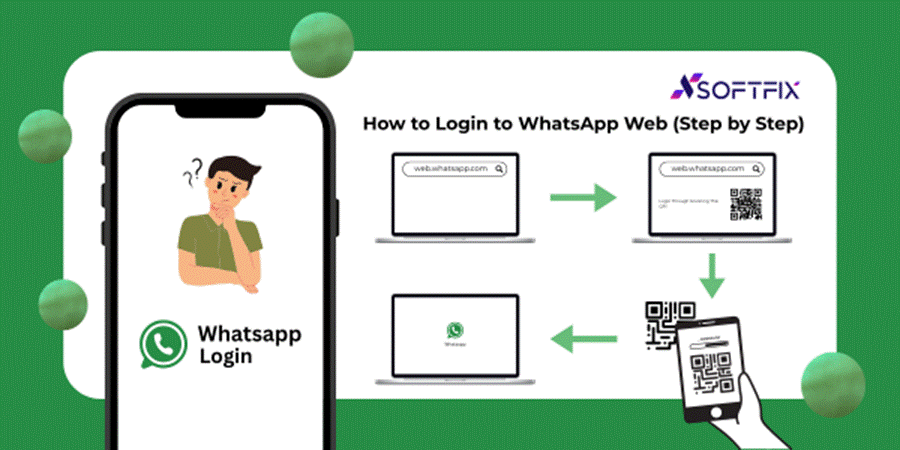
How to login to whatsapp web

WhatsApp Web Login with QR Code

The most common way to use WhatsApp Web login is by scanning the QR code. Think of it as your key—it connects your phone to your computer securely.

You must keep your phone nearby and connected to the internet.

If you log out, you’ll need to scan the QR code again.

The QR code refreshes every few seconds for extra security.

WhatsApp Web Login Without QR Code – Is It Possible?

A lot of people search for how to log in to WhatsApp Web without a QR code, or WhatsApp Web log in with a phone number only. Unfortunately, WhatsApp doesn’t allow this (yet).

Why? Because QR code login ensures your account is secure. If someone could log in with just your number, anyone could access your chats.

Some third-party tricks claim to offer WhatsApp Web login without a phone number or QR code, but they’re unsafe and can get your account hacked. Always stick to the official WhatsApp Web login official site.

[hfe_template id=’149′]

WhatsApp Web Login on Mobile or Tablet

Did you know you can also do WhatsApp Web login on a mobile phone or tablet? Here’s how:

  • Open Chrome or Safari on your tablet/phone.
  • Tap the three dots and select Desktop Site.
  • Go to web.whatsapp.com log in.
  • Scan the QR code using another phone.

This is handy if you want to use one WhatsApp account on two devices.
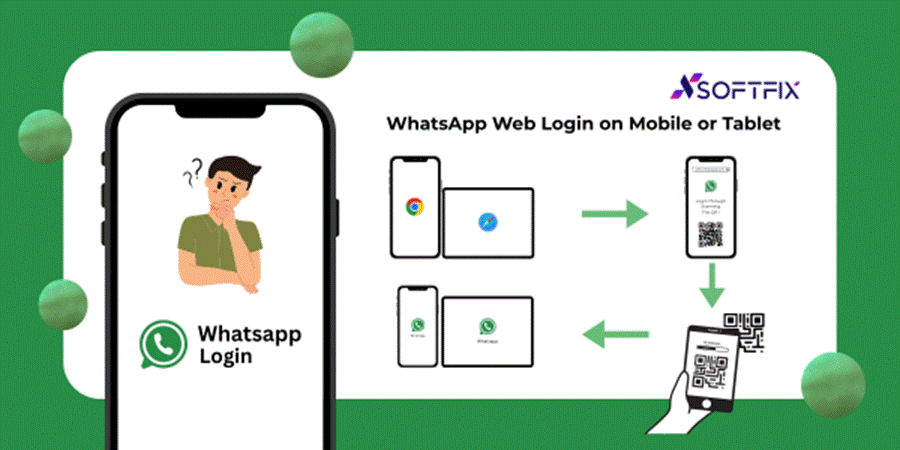
Whatsapp web Login on Mobile or Tablet

WhatsApp Business Web Login: For Work Made Easy

If you run a shop, service, or small business, WhatsApp Business Web login is a lifesaver. You can:

  • Reply to customer queries faster.
  • Share product photos and invoices easily.
  • Manage multiple chats without switching screens.
  • The process is the same as personal WhatsApp, but you log in with your WhatsApp Business app.

WhatsApp Web Login History: How to Check

Want to know if someone else is using your WhatsApp on their computer? Here’s how to check your WhatsApp Web login history:

  • Open WhatsApp on your phone.
  • Go to Settings > Linked Devices.
  • You’ll see all active WhatsApp Web login sessions.
  • If something looks suspicious, tap Log Out from all devices.
  • This keeps your account safe from unauthorized access.

WhatsApp Web Login Issues and Fixes

Sometimes you might face issues like “Why can’t I log in to WhatsApp Web?” Here are quick fixes:

  • Make sure your phone has internet.
  • Clear the browser cache and try again.
  • Use the official link: https://web.whatsapp.com login.
  • Restart both your phone and PC.

Tips to Stay Logged In

Many people ask: How to stay login in on WhatsApp Web?

  • While logging in, tick the box Keep me signed in.
  • Don’t clear cookies on your browser.
  • Make sure your phone stays connected to the internet.

WhatsApp Web Login Security – Stay Safe

Since WhatsApp Web mirrors your phone, security is important. Keep these in mind:

  • Never use WhatsApp Web login on public computers.
  • Always check your login history regularly.
  • If you’re done, log out from both the computer and your phone.
  • WhatsApp Web Login for Chrome & Desktop App
  • If you’re a regular user, you can either:
  • Use WhatsApp Web login in Chrome (or any browser), or
  • Download the official WhatsApp Desktop app for Windows/Mac.
  • Both work the same, but the desktop app is faster.

WhatsApp Web Login Without Phone: Myth or Reality?

Searches like how to login to WhatsApp Web without a phone are very common. Sadly, there’s no official way to do this.

WhatsApp is designed to sync messages directly with your phone. If your phone is off or has no internet, WhatsApp Web login won’t work.

FAQs About WhatsApp Web Login

Q1. How to log in to WhatsApp Web with a phone number?

Currently, it’s not possible. You need to scan the QR code with your phone.

Q2. Can I log in to WhatsApp Web without scanning QR code?

No, scanning the QR code is necessary for security.

Q3. How do I check WhatsApp Web login history?

Go to WhatsApp app > Settings > Linked Devices > check all active logins.

Q4. How to stay logged in on WhatsApp Web without scanning again?

Tick Keep me signed in when logging in.

Q5. Can I log in to WhatsApp Web on another phone?

Yes, by using Desktop Site mode on the browser.

Final Words

WhatsApp Web login is among the simplest ways to chat from your computer or tablet. No matter: You are replying to friends. Working with the WhatsApp Business Web login. Just don’t like typing on your phone. It makes life easier.

You can also read :
Difference Between Web 1.0, Web 2.0, and Web 3.0

The important thing to keep in mind is to always use the official WhatsApp Web login page. Scan the QR code.  Keep your internet connected. And take into account if you ever feel your account is being used without validation: check your WhatsApp Web login history and log out immediately. By following these tips, you will never be confused again: “How do I log in to WhatsApp Web?”

Document

Do you have a question related Custom Software?

Let's Talk

About Us

Softfix is a provider of custom software solutions, creating IT infrastructure software, automation systems, and network management tools. We have been providing exceptional service quality, dependable performance, and constant professionalism in all of our projects since 2020 to commercial clients.

Share:
Facebook-square X-twitter Linkedin-in
When a Fake Website Outsmarted the Real Creator in Search Results
09 March, 2026
Cloudflare Introduces Markdown for AI Bots: A Simple Guide
18 February, 2026
Google’s Core Update Could End the Era of Promotional Listicles
09 February, 2026
Google May Allow Websites To Opt Out Of AI Search Features
29 January, 2026
PwC Survey Finds Many CEOs Still Waiting for AI Returns
23 January, 2026
Why Google Search Console Shows Noindex Errors That Seem to Come From Nowhere
22 January, 2026
How to Track the User Journey in GA4 and Actually Show What SEO Is Doing
19 January, 2026
Difference Between AI and Automation: A Simple Business Guide by Softfix
12 January, 2026
Everything You Need To Know About Web Scraping and How to Use It
17 December, 2025
Difference Between Web 1.0, Web 2.0, and Web 3.0: Understanding the Evolution of the Web
17 November, 2025
Document

Do you have a question related Custom Software?

Let's Talk

Copyright © 2026 Softfix blog | Powered by Astra WordPress Theme

Softfix Technologies

We design, build and scale digital products that drive growth, efficiency and real impact for businesses worldwide.

ISO 9001:2015 Certified
ISO 27001:2022 Certified

SERVICES

  • Software Development
  • Application Development
  • Mobile App Development
  • Cloud Solutions
  • AI Solution
  • DevOps Services
  • QA Testing
  • Digital Marketing

INDUSTRIES

  • Healthcare
  • Fintech
  • eLearning
  • Real Estate
  • Tour & Travel
  • Education
  • Manufacturing
  • Logistics
  • eCommerce
  • Media & Entertainment
  • Non-Profit

COMPANY

  • About Us
  • Our Portfolio
  • Blogs
  • Careers
  • Why Choose Us
  • Contact Us

GET IN TOUCH

India Office 1st Floor, CP/140, Viraj Khand-4, Gomti Nagar, Lucknow,
Uttar Pradesh 226010
support@softfix.in sales@softfix.in
HR: +91-8189010042 Sales: +91-8189010046
Canada Office 2 Bloor Street West, Suite 700, Toronto Ontario M4W 3E2 Canada
info@softfixtechnologies.com sales@softfixtechnologies.com
Sales:+1-(647) 846-9494
300+
Projects Delivered
200+
Happy Clients
6+
Years of Experience
24×7
Support Available

© 2026 Softfix Technologies. All
Rights Reserved.

G o o g l e Partner
aws partner network
GoodFirms Top Rated Company
Privacy Policy Terms of Use
Call WhatsApp